Messaging
SMS Opt-In Evidence
PrefCA SMS enrollment happens inside a user's own authenticated account. There is no public or keyword-based signup. This page shows screenshots of the current Mobile number screen with fictitious sample data (reserved 555-01xx numbers, no real names). Inert HTML replicas accompany the screenshots. Disclosures and message samples are rendered from the same strings the application uses.
Opt-in paths
- Self-service consent. A signed-in user verifies a phone number with a one-time code, then grants SMS notification consent for that number on the Mobile number page (Mobile & texts in the account menu). Notification preferences also offers the consent button. This is the only path to recurring messages.
Consent is recorded per organization and per phone number, with a timestamp and the consent text version. Notification consent is never pre-selected. An opt-out (STOP) is recorded against the phone number and applies across every organization.
Step 1 — Phone verification
From the account menu, the user opens Mobile & texts to reach the Mobile number page, adds their number, and confirms it with a one-time code sent by text message or phone call. No notification consent is created at this step; a verified number is only a prerequisite.
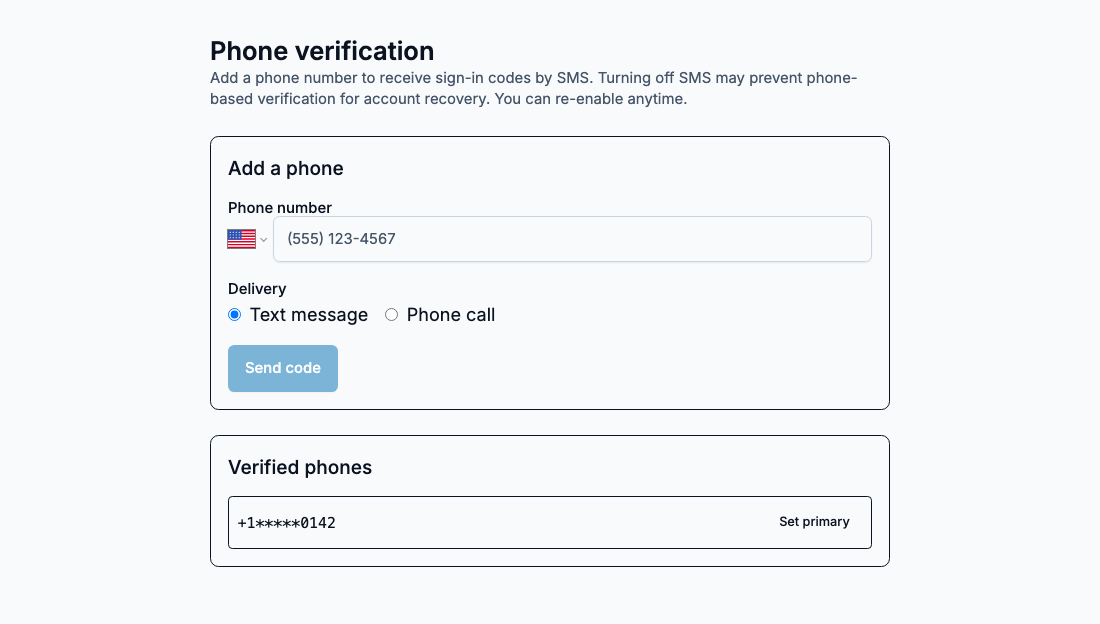
Your mobile number
Step 2 — Grant SMS consent
The Mobile number page shows the account's one verified number; there is no phone-number list to select from. The user must press Grant SMS consent to authorize recurring notification texts. The disclosure beside the button is rendered from the same string the application uses. Verifying a number does not grant this consent.
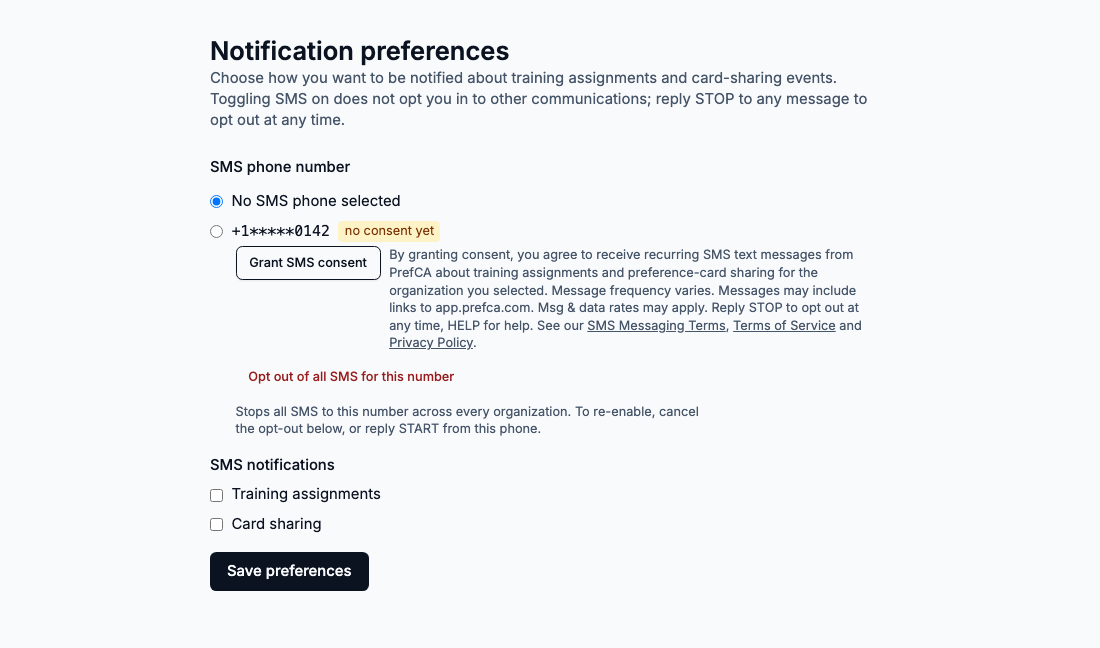
Your mobile number
By granting consent, you agree to receive recurring SMS text messages from PrefCA about training assignments and preference-card sharing for the organization you selected. Message frequency varies. Messages may include links to app.prefca.com. Msg & data rates may apply. Reply STOP to opt out at any time, HELP for help. See our SMS Messaging Terms, Terms of Service and Privacy Policy.
Pressing the button records the consent and sends one confirmation text (shown under Sample messages). The Mobile number page offers “Revoke SMS consent” once consent exists, and a separate opt-out action that records a STOP-equivalent for the number.
Step 2 for doctors — Turn on texts
Doctors belong to no organization and consent for themselves, on their own account. On the Mobile number page, which is also offered once right after a doctor confirms their NPI and can be skipped, the verified number is shown with a “Turn on texts” button. The disclosure beside it is rendered from the same string the application uses. Nothing is pre-selected.
+1*****0142 Verified
We’ll text you when a facility shares a preference card with you.
By turning on texts, you agree to receive recurring SMS text messages from PrefCA when a facility shares a preference card with you. Message frequency varies. Messages may include links to app.prefca.com. Msg & data rates may apply. Reply STOP to opt out at any time, HELP for help.
Pressing the button records the consent and sends the same confirmation text. The same page then offers “Turn off texts”, and a separate opt-out action for the number.
Sample messages
Rendered from the production message templates with a fictitious link; only templates with a live send path exist in the code. Every message carries the program name and opt-out instructions.
Preference Card App (PrefCA): you are opted in to SMS notifications about training and card sharing. Message frequency varies. Msg & data rates may apply. Reply STOP to opt out, HELP for help.
Preference Card App: a new training assignment is ready for you. https://app.prefca.com/i/abc123 Reply STOP to opt out.
Preference Card App: a facility shared a preference card with you. https://app.prefca.com/i/abc123 Reply STOP to opt out.
Preference Card App sign-in link (expires in 10 min): https://app.prefca.com/i/abc123 Reply STOP to opt out.
The verification code is sent through a separate verification service, one code per user request, and is not part of the recurring notification program.
The sign-in message is also outside the recurring program, and the consent screens above do not gate it. It is sent only when a user enters their own phone number on the sign-in page and presses the button, and only to a number already verified on that account by the one-time code shown above. It is single-use, expires in about ten minutes, and each number is capped to a small number of sign-in messages per day. A number that has replied STOP receives none. Users can turn text sign-in off in their account at any time.
Opt-out, resubscribe, and help
- Opt out: reply STOP, STOPALL, UNSUBSCRIBE, CANCEL, END, QUIT, REVOKE, OPTOUT. The number is marked opted out for every organization and every active consent for it is revoked.
- Resubscribe: reply START, UNSTOP, YES from the same phone. That clears the opt-out and restores the consent held before STOP. A consent revoked in the app can be granted again on the Mobile number page (or Notification preferences for organization notification consent).
- Help: reply HELP, INFO, or email support@prefca.com.
Full program terms: https://app.prefca.com/messaging-terms. Privacy policy: https://app.prefca.com/privacy.